


Skip to content
en
USD
Skip to product information
Description
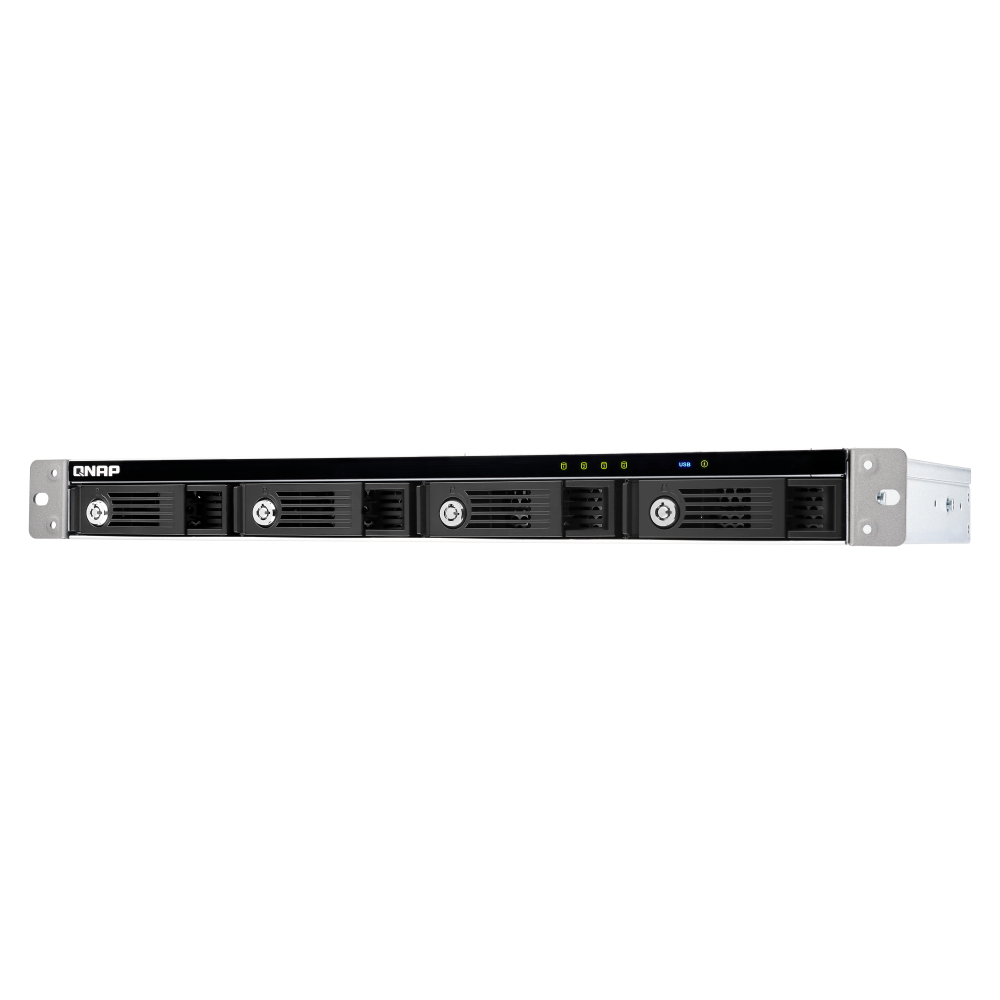
8-Bay USB 4 Desktop JBOD

QNAP TL-D810TC4

The desktop QNAP TL-D810TC4 provides eight SATA drive bays and a USB 4 Type-C host interface with transfer speeds up to 40Gbps. It is designed to expand storage for compatible QNAP NAS systems, Windows PCs, Macs and Ubuntu systems while supporting high-capacity data storage, backup and migration workflows.

Important: The enclosure is supplied without drives. USB 3 and earlier connections are not supported. Connect the TL-D810TC4 directly to the host system rather than through a USB hub or docking station.

What is the QNAP TL-D810TC4?

The TL-D810TC4 is an eight-bay desktop JBOD expansion enclosure with SATA 6Gb/s drive bays, hot-swappable trays and one USB 4 Type-C host interface. It can be configured as NAS expansion storage, an external-disk enclosure or host-managed software RAID storage, depending on the connected system.

8 BaysEight hot-swappable SATA drive bays
40GbpsUSB 4 Type-C host interface
Up to 208TBMaximum raw capacity using eight 26TB drives
UASPReduced transfer delay on supported hosts and operating systems

High-Speed USB 4 Storage Expansion

Fast direct-attached storage for large-file access, backups and data movement.

The USB 4 Type-C interface supports transfer speeds up to 40Gbps, with actual performance depending on the connected device and cable. A USB 4 Type-C cable is included, and the supplied information recommends using a cable no longer than one metre.

Built-in UASP support can improve transfer efficiency and reduce waiting time when the connected computer and operating system also support UASP.

Flexible Storage for NAS, Windows, Mac and Ubuntu

Use the enclosure for managed NAS expansion, external disks or host-based software RAID.

01

Independent NAS Storage Pool

QNAP Storage & Snapshots Manager can create an independent storage pool on the TL-D810TC4, with support for RAID migration, disk replacement, S.M.A.R.T. monitoring and notifications.

02

External Disk Mode

Each installed drive can be presented as independent storage for quick transfers or short-term backup requirements.

03

Host-Based Software RAID

Windows, Mac and Linux hosts can use their built-in storage tools to combine drives into software RAID where supported.

Drive Access, Cooling and Physical Security

Designed for convenient day-to-day operation and drive management.

04

Hot-Swappable Drive Bays

Eight front-access drive bays support hot swapping for easier drive replacement and maintenance.

05

Lockable Trays

The included key can lock each drive tray to help prevent unintended drive removal.

06

Adjustable Fan Mode

A fan mode switch provides Auto, high, medium and low settings for the two 120mm cooling fans.

Host-Based Power Management

Coordinated power behaviour supports stable operation.

When the connected host powers on or off, the JBOD can synchronise its power state with the host. The supplied instructions state that the correct power-on and power-off procedures in the user manual must be followed to avoid abnormal performance.

Measured Transfer Performance

Laboratory results from an eight-drive SSD configuration.

Platform and RAID Read Write
QTS RAID 0 2976 MB/s 2236 MB/s
QTS RAID 5 2977 MB/s 1802 MB/s
Windows RAID 0 2734 MB/s 2272 MB/s
Windows RAID 5 2720 MB/s 717 MB/s
Ubuntu RAID 0 2997 MB/s 2191 MB/s
Ubuntu RAID 5 2977 MB/s 1339 MB/s

Tested in QNAP laboratories using a TVS-h874T with an Intel Core i7 12-core processor, 32GB RAM and eight Samsung 870 EVO 1TB SSDs. Results may vary depending on the actual environment.

Supported Management Options

Monitor enclosure and drive status from supported host platforms.

QNAP NAS Management

Storage & Snapshots Manager can configure storage, monitor S.M.A.R.T. information and create notifications for drive health.

QNAP JBOD Manager

JBOD Manager can monitor system and disk status, fan speed and recorded device events, with real-time desktop notifications for abnormal conditions.

Compatibility and Deployment Requirements

Check the host platform, operating system and direct-connection requirements before deployment.

  • QNAP NAS support requires QTS 5.2.x or later, or QuTS hero 5.2.8 or later.
  • Supplied operating-system requirements include Windows 11 or later, macOS 12.0 or later and Ubuntu 22.04 or later.
  • USB 3 and earlier versions are not supported.
  • Connect the enclosure directly to the USB port of the NAS, PC or Mac. Do not place a USB hub or docking station between the host and the expansion unit.
  • When using the QXP-40G2UC expansion card, some NAS models require a minimum BIOS version update.
  • The TL-D810TC4 can only be migrated with TL USB series JBODs, not with other JBODs or devices.
  • A software RAID created on one platform cannot be used across different platforms.

Frequently Asked Questions

Quick answers about the QNAP TL-D810TC4.

Does the TL-D810TC4 include hard drives or SSDs?

No. The enclosure is supplied without drives.

How many drive bays does it have?

It has eight hot-swappable SATA drive bays.

What is the maximum raw storage capacity?

The supplied product information states a maximum raw capacity of up to 208TB using eight 26TB drives.

What connection does the TL-D810TC4 use?

It has one USB 4 Type-C host interface supporting speeds up to 40Gbps. Actual performance depends on the host device and cable.

Can it connect through a USB hub or docking station?

No. The supplied instructions require a direct connection to the USB port of the NAS, PC or Mac.

Can it be added to a NAS main storage pool?

No. It can be used as an independent storage pool or disk area, but it cannot be merged with the NAS main storage pool or disk area.

Can system applications be installed on the TL-D810TC4?

No. System applications can only be installed on the NAS itself.

Which versions of QTS and QuTS hero are supported?

The supplied information specifies QTS 5.2.x or later and QuTS hero 5.2.8 or later.

Connection note: Use the included USB 4 Type-C cable or a suitable cable no longer than one metre. Actual transfer performance depends on the connected host, drives, RAID configuration, cable and operating environment.

Product images are for illustrative purposes only. Designs and specifications may change without notice.

QNAP TL-D810TC4 8-bay desktop USB 4 (40Gbps) Type-C JBOD expansion unit

Regular price $815.00
Sold Out

Tax included.

Contact for Pre-Order Check for more accurate ETA and pre-order
8-Bay USB 4 Desktop JBOD

QNAP TL-D810TC4

The desktop QNAP TL-D810TC4 provides eight SATA drive bays and a USB 4 Type-C host interface with transfer speeds up to 40Gbps. It is designed to expand storage for compatible QNAP NAS systems, Windows PCs, Macs and Ubuntu systems while supporting high-capacity data storage, backup and migration workflows.

Important: The enclosure is supplied without drives. USB 3 and earlier connections are not supported. Connect the TL-D810TC4 directly to the host system rather than through a USB hub or docking station.

What is the QNAP TL-D810TC4?

The TL-D810TC4 is an eight-bay desktop JBOD expansion enclosure with SATA 6Gb/s drive bays, hot-swappable trays and one USB 4 Type-C host interface. It can be configured as NAS expansion storage, an external-disk enclosure or host-managed software RAID storage, depending on the connected system.

8 BaysEight hot-swappable SATA drive bays
40GbpsUSB 4 Type-C host interface
Up to 208TBMaximum raw capacity using eight 26TB drives
UASPReduced transfer delay on supported hosts and operating systems

High-Speed USB 4 Storage Expansion

Fast direct-attached storage for large-file access, backups and data movement.

The USB 4 Type-C interface supports transfer speeds up to 40Gbps, with actual performance depending on the connected device and cable. A USB 4 Type-C cable is included, and the supplied information recommends using a cable no longer than one metre.

Built-in UASP support can improve transfer efficiency and reduce waiting time when the connected computer and operating system also support UASP.

Flexible Storage for NAS, Windows, Mac and Ubuntu

Use the enclosure for managed NAS expansion, external disks or host-based software RAID.

01

Independent NAS Storage Pool

QNAP Storage & Snapshots Manager can create an independent storage pool on the TL-D810TC4, with support for RAID migration, disk replacement, S.M.A.R.T. monitoring and notifications.

02

External Disk Mode

Each installed drive can be presented as independent storage for quick transfers or short-term backup requirements.

03

Host-Based Software RAID

Windows, Mac and Linux hosts can use their built-in storage tools to combine drives into software RAID where supported.

Drive Access, Cooling and Physical Security

Designed for convenient day-to-day operation and drive management.

04

Hot-Swappable Drive Bays

Eight front-access drive bays support hot swapping for easier drive replacement and maintenance.

05

Lockable Trays

The included key can lock each drive tray to help prevent unintended drive removal.

06

Adjustable Fan Mode

A fan mode switch provides Auto, high, medium and low settings for the two 120mm cooling fans.

Host-Based Power Management

Coordinated power behaviour supports stable operation.

When the connected host powers on or off, the JBOD can synchronise its power state with the host. The supplied instructions state that the correct power-on and power-off procedures in the user manual must be followed to avoid abnormal performance.

Measured Transfer Performance

Laboratory results from an eight-drive SSD configuration.

Platform and RAID Read Write
QTS RAID 0 2976 MB/s 2236 MB/s
QTS RAID 5 2977 MB/s 1802 MB/s
Windows RAID 0 2734 MB/s 2272 MB/s
Windows RAID 5 2720 MB/s 717 MB/s
Ubuntu RAID 0 2997 MB/s 2191 MB/s
Ubuntu RAID 5 2977 MB/s 1339 MB/s

Tested in QNAP laboratories using a TVS-h874T with an Intel Core i7 12-core processor, 32GB RAM and eight Samsung 870 EVO 1TB SSDs. Results may vary depending on the actual environment.

Supported Management Options

Monitor enclosure and drive status from supported host platforms.

QNAP NAS Management

Storage & Snapshots Manager can configure storage, monitor S.M.A.R.T. information and create notifications for drive health.

QNAP JBOD Manager

JBOD Manager can monitor system and disk status, fan speed and recorded device events, with real-time desktop notifications for abnormal conditions.

Compatibility and Deployment Requirements

Check the host platform, operating system and direct-connection requirements before deployment.

  • QNAP NAS support requires QTS 5.2.x or later, or QuTS hero 5.2.8 or later.
  • Supplied operating-system requirements include Windows 11 or later, macOS 12.0 or later and Ubuntu 22.04 or later.
  • USB 3 and earlier versions are not supported.
  • Connect the enclosure directly to the USB port of the NAS, PC or Mac. Do not place a USB hub or docking station between the host and the expansion unit.
  • When using the QXP-40G2UC expansion card, some NAS models require a minimum BIOS version update.
  • The TL-D810TC4 can only be migrated with TL USB series JBODs, not with other JBODs or devices.
  • A software RAID created on one platform cannot be used across different platforms.

Frequently Asked Questions

Quick answers about the QNAP TL-D810TC4.

Does the TL-D810TC4 include hard drives or SSDs?

No. The enclosure is supplied without drives.

How many drive bays does it have?

It has eight hot-swappable SATA drive bays.

What is the maximum raw storage capacity?

The supplied product information states a maximum raw capacity of up to 208TB using eight 26TB drives.

What connection does the TL-D810TC4 use?

It has one USB 4 Type-C host interface supporting speeds up to 40Gbps. Actual performance depends on the host device and cable.

Can it connect through a USB hub or docking station?

No. The supplied instructions require a direct connection to the USB port of the NAS, PC or Mac.

Can it be added to a NAS main storage pool?

No. It can be used as an independent storage pool or disk area, but it cannot be merged with the NAS main storage pool or disk area.

Can system applications be installed on the TL-D810TC4?

No. System applications can only be installed on the NAS itself.

Which versions of QTS and QuTS hero are supported?

The supplied information specifies QTS 5.2.x or later and QuTS hero 5.2.8 or later.

Connection note: Use the included USB 4 Type-C cable or a suitable cable no longer than one metre. Actual transfer performance depends on the connected host, drives, RAID configuration, cable and operating environment.

Product images are for illustrative purposes only. Designs and specifications may change without notice.

Drawer Title
Similar Products